Removing Unwanted Headers from Your CloudFront Distribution

As cloud architects, we regularly encounter challenges when working with clients Amazon CloudFront configuration. One common issue is the need to remove or modify certain headers from origin responses, particularly those that might reveal sensitive information about infrastructure components like KMS keys. While this isn't necessarily a direct security risk, reducing exposed information about backend systems which also reveal your AWS account ID is a good practice in maintaining a robust security posture.
In this article, we'll explore two practical solutions to solving this problem:
- Using CloudFront Functions and an example javascript function.
- Creating CloudFront Response Policies with a Terraform example.
By the end of this post, you'll understand:
- The problem of unwanted headers in CloudFront distributions
- How to implement CloudFront Functions for header removal
- How to create and apply CloudFront Response Policies
- When to use each approach and their respective pros and cons
The Problem: Unwanted Headers in CloudFront
When you configure your CloudFront distribution to use KMS encryption for your assets being served up from S3, the origin response includes headers that reveal sensitive information about your keys. This can be problematic if you're working with sensitive data or you need to comply with strict security regulations and especially not disclose your AWS account ID too.
Examples of such headers include:
X-Amz-Cf-KmsKeyIdX-Amz-Cf-KeyArnx-amz-server-side-encryption-aws-kms-key-id
Removing these headers before they reach the end user is crucial for maintaining the confidentiality of your backend infrastructure and there are a couple of neat ways to do this.
Solution Approaches
1. CloudFront Functions
CloudFront Functions are lightweight JavaScript code snippets that run at CloudFront edge locations. They're designed for high-performance, short-running tasks and are ideal for simple transformations on viewer requests or origin responses.
Key features of CloudFront Functions:
- Fast execution times (sub-millisecond latency)
- Limited to basic JavaScript (ES5.1) with no external libraries as well as some features from ES6 through 12
- Cannot access external resources or perform complex computations
- Ideal for simple header modifications, URL rewrites, or request/response manipulation
2. CloudFront Response Policies
CloudFront Response Policies offer a more robust and configurable approach to modifying origin responses. They allow you to define rules for adding, modifying, or removing headers without writing code.
Key features of Response Policies:
- No code required, configured through AWS Console, CLI, or infrastructure-as-code tools
- Can be reused across multiple CloudFront distributions
- More flexibility in header manipulation, including conditional logic
- Slightly higher latency compared to CloudFront Functions, but still very fast
Let's dive into how to implement each of these solutions...
Using a CloudFront Function
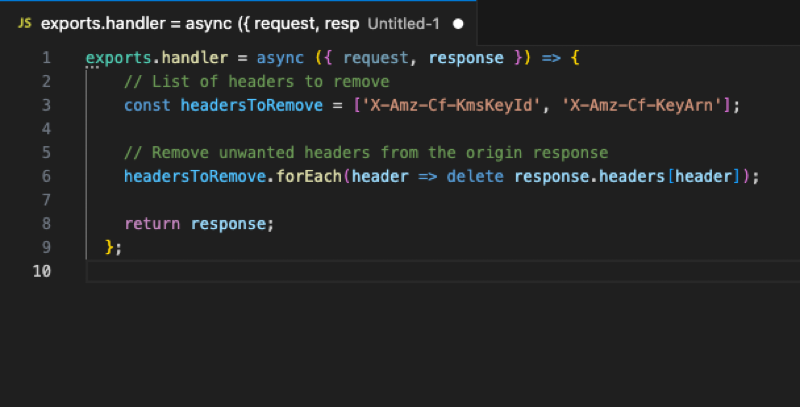
One way to achieve this is by using a CloudFront function. A CloudFront function is a small piece of JavaScript code that can run at the edge and manipulate the response as needed. To use a CloudFront function to remove unwanted headers, follow these steps:
- Select your CloudFront distribution
- Go to the Behaviors tab and click on Edit
- In the Function Association Section , choose Origin Response association , select the Cloudfront Function function type
- Add the arn of your Cloudfront Function which you had previously created and published
- Cloudfront
- Functions
- Create Function
Here's an example of how you might use a CloudFront function to remove unwanted headers:
exports.handler = async (event) => {
  const request = event.request;
  const response = event.response;

  // Remove unwanted headers from the origin response
  delete response.headers['X-Amz-Cf-KmsKeyId'];
  delete response.headers['X-Amz-Cf-KeyArn'];

  return response;
};
Using a CloudFront Response Policy
Another approach is to use a CloudFront response policy. A response policy allows you to specify rules for modifying the origin response before it's cached and served by CloudFront.
To create a CloudFront response policy, follow these steps:
- Go to the Response Policies tab in your CloudFront distribution
- Click on Create Response Policy
- Define your policy using AWS CLI or Terraform
Here's an example of how you might use Terraform to set up a CloudFront response policy:
resource "aws_cloudfront_response_headers_policy" "security_headers" {
  name    = "cloudfront-response-headers-policy-no-kms-headers"
  comment = "Remove response headers"

  remove_headers_config {
    dynamic "items" {
      for_each = [
        "x-amz-apigw-id",
        "x-amz-version-id",
        "x-amz-server-side-encryption-bucket-key-enabled",
        "x-amz-server-side-encryption",
        "x-amz-request-id",
        "x-amz-server-side-encryption-aws-kms-key-id"
      ]
      content {
        header = items.value
      }
    }
  }
 }
Conclusion
In this article, we explored two approaches to removing unwanted headers from your CloudFront distribution: using a CloudFront function and creating a CloudFront response policy. By choosing the right approach for your use case, you can ensure that your origin responses are secure and compliant with your organization's security regulations.